Last updated on Thursday, 02/10/2025 at 11:16 PM IST
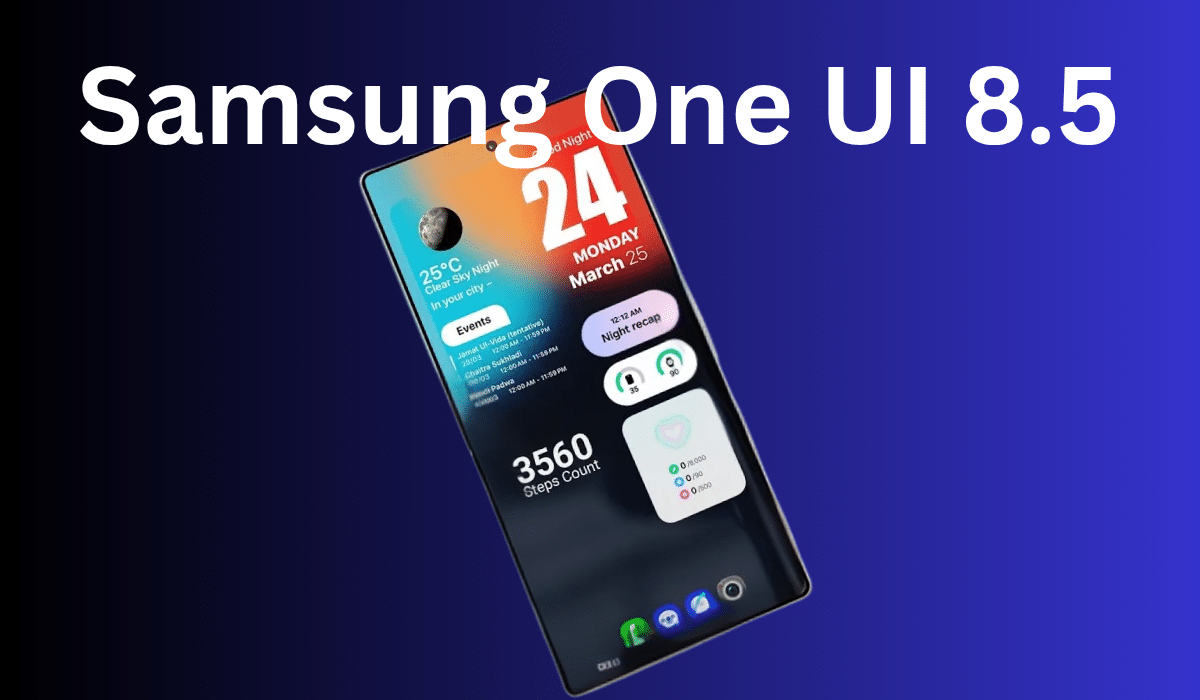
Samsung One UI 8.5 emerges as the most significant interface update in years, introducing groundbreaking customization capabilities that redefine how users interact with their Galaxy devices. Built on Android 16 foundation, this comprehensive update delivers unprecedented Quick Panel flexibility and visual enhancements that position Samsung ahead of competitor interfaces.
The latest Samsung interface update represents a major leap forward in user personalization, with early hands-on experiences revealing extensive customization options that transform the traditional Samsung experience into something entirely new.
Table of Contents
Revolutionary Quick Panel Customization
The standout Samsung One UI 8.5 features center around a completely redesigned Quick Panel system that offers unlimited customization possibilities. Users can now position any toggle, widget, or slider precisely where they want, with volume and brightness controls available in both horizontal and vertical orientations. This level of Samsung customization options was previously unavailable in any One UI version.
The notification panel customization extends beyond basic toggles, allowing users to strip down the interface to minimal elements or create complex layouts with multiple widgets and controls. Beta testers report that the Quick Panel customization feels intuitive while providing professional-level control over the interface layout.
Visual Enhancement and Design Evolution
Samsung One UI 8.5 introduces refined animations and visual elements throughout the system, with particular emphasis on lock screen improvements. New animated clock styles complement enhanced notification displays featuring reduced transparency and sophisticated frosted glass backgrounds that improve readability.
The Gallery app receives a dramatic makeover with larger buttons and album previews showcasing the latest photos or videos instead of generic backgrounds. These visual changes align with modern design trends while maintaining Samsung’s distinctive interface identity.
Settings app improvements include more rounded corners, enhanced spacing, and smoother animations, with the search bar relocated to the bottom for improved accessibility. The battery indicator evolution replaces traditional icons with percentage displays that dynamically change color and transform into leaf icons during power-saving modes.
Device Compatibility and Galaxy Models Support
Which Galaxy models will get One UI 8.5 next depends on Samsung’s established update timeline, with flagship devices receiving priority access. The compatibility list includes Galaxy phones launched since 2022 and numerous mid-range devices from 2023 onwards, ensuring broad Samsung software update coverage across the ecosystem.
Galaxy S26 series devices will launch with One UI 8.5 pre-installed, while existing flagship models including the Samsung Galaxy S26 Ultra expected launch in January 2026 will receive the update through Samsung’s phased rollout strategy. The One UI 8.5 release date for different device tiers will follow Samsung’s traditional pattern of flagship-first distribution.
Performance Integration and Hardware Synergy
One UI 8.5 optimization extends beyond visual improvements to include enhanced performance integration with next-generation chipsets. The interface works seamlessly with advanced processors, and the Snapdragon 8 Elite Gen 5 ultimate speed and AI power creates a synergistic relationship between software customization and hardware performance capabilities.
Beta testing reveals improved system responsiveness and enhanced AI integration that leverages modern chipset capabilities for smoother animations and faster customization changes. These optimizations position Samsung favorably against competitors including devices like the Nothing Phone 4a Pro launching in March 2026.
Installation and Beta Access Guidelines
How to get One UI 8.5 beta access requires enrollment through Samsung Members app for eligible Galaxy devices. The beta program typically opens several months before official release, allowing enthusiasts early access to Samsung One UI 8.5 features for testing and feedback.
Step-by-step guide to install One UI 8.5 on S25 Ultra will follow Samsung’s standard over-the-air update process once beta testing concludes. Users should ensure adequate storage space and stable internet connectivity before initiating the installation process.
Competitive Positioning and Future Outlook
How One UI 8.5 compares to One UI 8 on Fold devices showcases Samsung’s commitment to foldable-specific optimizations while maintaining consistency across device categories. The interface improvements demonstrate Samsung’s leadership in Android customization and user experience innovation.
What are the biggest visual changes in One UI 8.5 encompass the Quick Panel redesign, enhanced lock screen animations, refined Settings interface, and improved Gallery app aesthetics. These changes collectively create a more personalized and visually appealing user experience that sets new standards for Android interfaces.
Samsung One UI 8.5 represents the evolution of mobile interface design, combining extensive customization capabilities with refined visual elements and enhanced performance optimization. The update solidifies Samsung’s position as the leader in Android customization while delivering practical improvements that enhance daily device usage.
Frequently Asked Questions
Q: Which is the latest Samsung One UI version?
A: Samsung One UI 8 currently represents the latest stable release, with One UI 8.5 in advanced beta testing phases. The Android 16 update brings significant improvements over previous versions.
Q: Is One UI 8 coming soon?
A: One UI 8 has already begun rolling out to Galaxy devices, with One UI 8.5 expected to launch alongside Galaxy S26 series in early 2026.
Q: What Samsung phones will get One UI 8?
A: Galaxy devices from 2022 onwards are eligible for One UI 8, including flagship S-series, Note series, Z-series foldables, and select A-series mid-range models.
Q: How long does One UI 8.5 installation take?
A: The One UI 8.5 installation typically takes 15-30 minutes depending on your device model and storage speed. Ensure your device has at least 50% battery and stable Wi-Fi connection before starting.
Q: Will One UI 8.5 slow down older Galaxy phones?
A: Samsung has optimized One UI 8.5 for better performance across supported devices. However, phones from 2022 may experience slightly slower animations compared to newer flagships, but overall functionality remains smooth.
Q: Can I downgrade from One UI 8.5 to One UI 8?
A: Downgrading from One UI 8.5 to previous versions is not officially supported and may require factory reset. Samsung recommends staying on the latest version for security and feature benefits.
Q: Does One UI 8.5 drain battery faster?
A: Initial reports suggest One UI 8.5 maintains similar battery performance to One UI 8, with some users reporting slight improvements due to better optimization and new power management features.
Q: Can I customize the Quick Panel on Galaxy Watch with One UI 8.5?
A: One UI 8.5 primarily focuses on smartphone interfaces. Galaxy Watch customization features depend on separate Wear OS updates and Samsung’s wearable software development timeline.